
Step by Step on how to register a web domain
A Namecheap domain registration

Luciana Soldi Bullara
Last Update 4 年前
- Acess Namecheap and you will find the domain search field;
- Check all the available extensions options and prices for the desired domain;
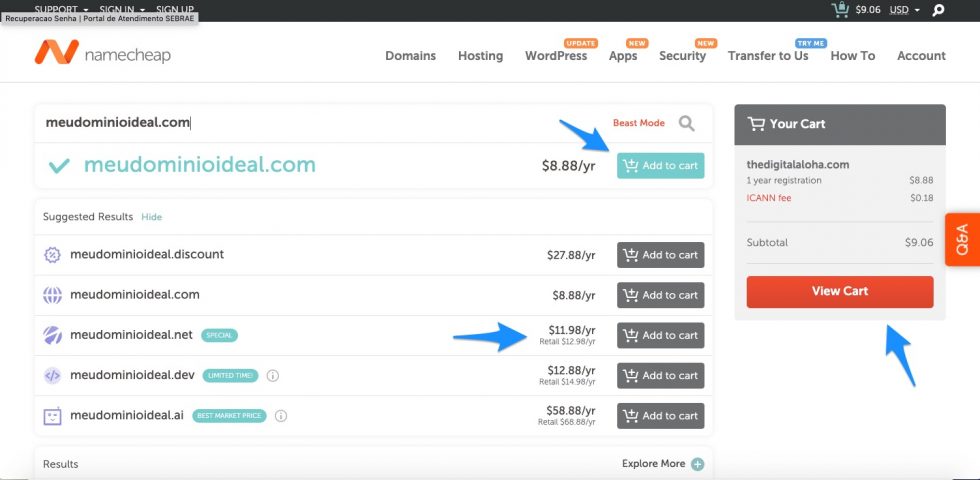
3. "Add to Cart" all the desired domain extensions you want you want to purchase. Your total will be updated in the column on the right. When finished, click on “View Cart” or “Check Out” to proceed.
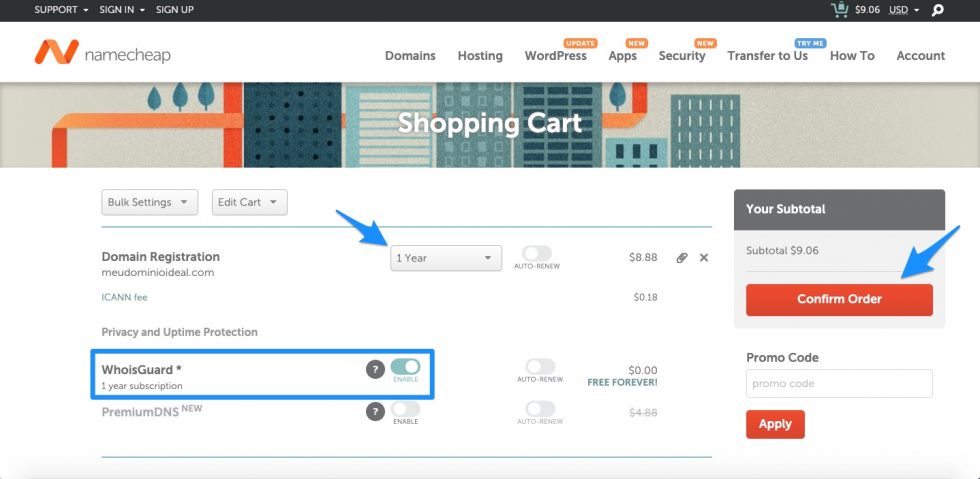
4. Select the desired service period, with “Who is Guard – Free Forever” checkbox selected and proceed by clicking on “Confirm Order”;
5. Create an account by filling in all the requested data. In the “Setup” tab, accept the default settings for the fields under “User Default Account Contact” section. Relax, this can be changed later.
6. The option “Associate to this domain and enable at the time of purchase” must be selected.
Proceed to payment by entering your credit card details. It's an annual charge, and the amount varies according to the contracted period.
- We recommend contracting for a period of 1 to 2 years, with an automatic renewal if possible, so there is no risk of losing the domain registration for some other registar.
- Take note of the received information by email about your registered domains, as well as your login credentials to access Namecheap.
In addition, a domain registration is a simple process. The most complex and strategic step is to choose the ideal domains for your business, as this will affect your search engine's ranking as well as your marketing strategy.